How to Show Capital Gains in ITR-2: FY 2025-26 Guide

A step-by-step walkthrough for salaried investors who sold mutual funds or stocks in FY 2025-26 and need to report those gains in ITR-2 before July 31, 2026.
Selling mutual fund units or stocks in FY 2025-26 creates a tax obligation — and a reporting one. The capital gains must appear in your ITR-2 before July 31, 2026. If they don’t, you risk a defective return notice, interest on unpaid tax, and the permanent loss of the right to carry forward any losses from this year.
This guide walks through the process in the order you actually encounter it — what documents to collect first, what changed for AY 2026-27 (and what no longer applies), which schedule receives which type of gain, and the two mistakes that catch most first-time ITR-2 filers.
What changed for AY 2026-27 — read this before you start
Two significant changes affect how capital gains are reported this year compared to last year. Getting these wrong leads to mismatches with the AIS data the Income Tax Department already holds.
1. The July 23, 2024 date split has been removed
In AY 2025-26 (last year’s filing), investors had to split their capital gains into pre- and post-July 23, 2024 transactions, because Budget 2024 changed the tax rates mid-year. This year, that split is gone. Since all of FY 2025-26 (April 1, 2025 to March 31, 2026) falls after July 23, 2024, uniform rates apply to every transaction. The ITR-2 form for AY 2026-27 reflects this — the separate pre-July 23 fields have been removed. You do not need to bifurcate anything.
2. Section 87A rebate does not apply to capital gains taxed at special rates
The Section 87A rebate — which makes total income up to ₹12 lakh effectively tax-free under the new regime — does not apply to capital gains taxed at special flat rates (STCG under Section 111A and LTCG under Section 112A). This catches many salaried investors by surprise. Even if your total income including gains is below ₹12.75 lakh, a ₹50,000 short-term gain on shares is taxed at 20% flat — the rebate cannot offset this tax. The income tax portal calculates this automatically, but understanding why the tax appears is important before you assume something has gone wrong.
The tax rates that apply to FY 2025-26 gains
All of FY 2025-26 uses these rates — no date-based split required:
| Asset type | Holding period | Tax rate | Section |
| Listed equity shares / equity mutual funds | 12 months or less (STCG) | 20% flat | 111A |
| Listed equity shares / equity mutual funds | More than 12 months (LTCG) | 12.5% on gains above ₹1.25L/year (first ₹1.25L tax-free) | 112A |
| Debt mutual funds (bought after April 1, 2023) | Any period | Added to income, taxed at your slab rate | No special rate |
| Debt mutual funds (bought before April 1, 2023) | 36 months or less (STCG) | Added to income, taxed at slab rate | — |
| Debt mutual funds (bought before April 1, 2023) | More than 36 months (LTCG) | 20% with indexation | 112 |
| Gold ETFs / international funds | 24 months or less | Slab rate | — |
| Gold ETFs / international funds | More than 24 months | 12.5% without indexation | 112 |
| One important clarification on the ₹1.25 lakh LTCG exemption: The ₹1.25 lakh is an annual exemption on all LTCG from equity and equity mutual funds combined — not per fund or per transaction. If you have ₹80,000 LTCG from stocks and ₹60,000 LTCG from mutual funds, your combined LTCG is ₹1.40 lakh. Only ₹15,000 (₹1.40L minus ₹1.25L) is taxable at 12.5% — a tax of ₹1,875. |
Documents to collect before you open the ITR portal
The ITR-2 form pre-fills data from your AIS, but the pre-filled data must be verified against your own records. Discrepancies between what you report and what the AIS shows invite notices. Collect these before logging in:
For mutual fund gains
- Capital gains statement from CAMS: camsonline.com → Investors → Statements → Capital Gain and Capital Loss Statement. Select FY 2025-26, All Mutual Funds, Excel format.
- Capital gains statement from KFintech: mfs.kfintech.com → Investor → Capital Gains and Loss Account Statement. Select FY 2025-26.
- Why both: Different fund houses use different registrars. HDFC, SBI, Nippon use CAMS. Axis, Kotak, Mirae use KFintech. If you have funds from both sets of AMCs, you need both statements. If you are unsure, download both — duplicates are rare and easy to spot.
For stock gains
- Capital gains statement from your broker: Download from your broker app — Zerodha, Groww, Upstox, Angel One, or others — under Tax → Capital Gains Statement or P&L Statement for FY 2025-26. Most brokers provide a consolidated statement in a format compatible with the ITR portal.
- ISIN-wise transaction details: Schedule 112A requires the ISIN (stock identifier) of each equity share or mutual fund sold. Your broker’s statement includes this. Do not try to fill Schedule 112A without the ISIN data — it will fail validation.
Cross-check documents
- AIS (Annual Information Statement): incometax.gov.in → e-File → Income Tax Returns → View AIS. This shows what the Income Tax Department already has from mutual fund RTAs and depositories. Your reported figures should match this.
- Form 26AS: Confirms TDS deducted, if any. Most capital gains do not attract TDS unless the redemption is from debt funds with TDS deducted at source.
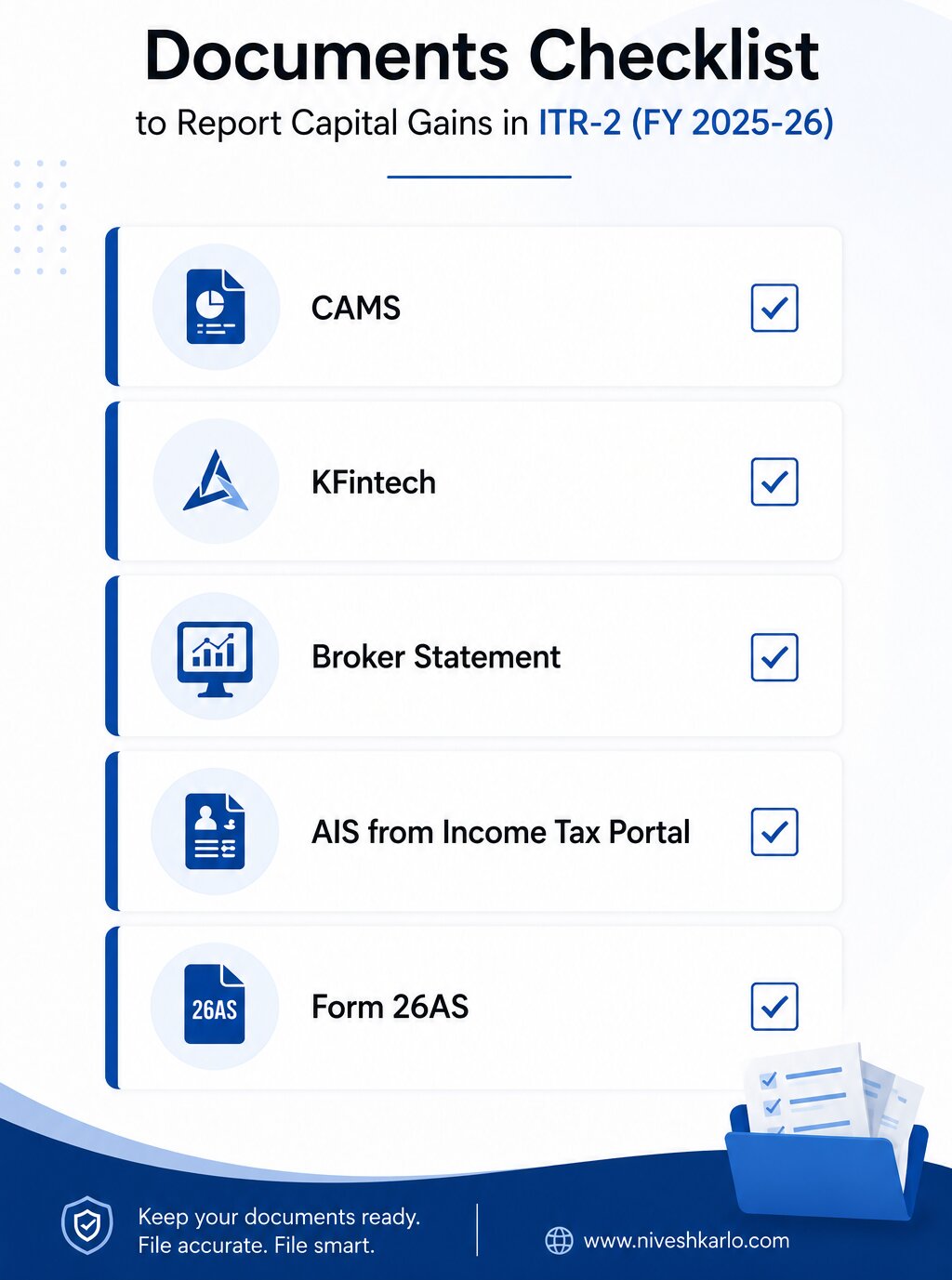
Image Source : AI
How to fill Schedule CG and Schedule 112A — step by step
Log in to incometax.gov.in with your PAN. Go to e-File → Income Tax Returns → File Income Tax Return. Select AY 2026-27 and ITR-2. The portal will pre-fill data from your AIS. Verify it against your downloaded statements before proceeding.
Step 1: Navigate to Schedule Capital Gains (Schedule CG)
In the ITR-2 form, find ‘Schedule CG’ — Capital Gains. This is the master schedule where all types of capital gains are entered. It has sub-sections for STCG and LTCG across different asset categories. You will use this for all gains except LTCG from equity shares and equity mutual funds under Section 112A, which have their own dedicated schedule.
Step 2: Enter STCG from equity shares and equity mutual funds
In Schedule CG, locate the section for Short-Term Capital Gains under Section 111A — gains from sale of equity shares or units of equity-oriented mutual funds where STT (Securities Transaction Tax) was paid. Enter: the sale consideration, cost of acquisition, and expenses on transfer. The portal calculates the STCG automatically. This amount is taxed at a flat 20%. Do not enter STCG from equity here if it falls under Section 112A — that goes in Step 3.
Step 3: Fill Schedule 112A for LTCG from equity and equity mutual funds
Schedule 112A is a separate, dedicated schedule for LTCG under Section 112A — gains from equity shares and equity mutual funds held for more than 12 months. This schedule requires transaction-by-transaction entry with ISINs. Here is what each entry needs:
| Field | What to enter |
| ISIN | The ISIN code of the share or mutual fund (from your broker/CAMS/KFintech statement) |
| Name of share / unit | Name of the company or fund |
| Units sold | Number of units or shares sold during the year |
| Sale price per unit | Price at which you sold |
| Cost of acquisition per unit | Original purchase price — or Fair Market Value as on Jan 31, 2018 for units bought before that date (grandfathering) |
| Expenditure wholly related to transfer | Brokerage, STT paid on sale (STT on purchase is not deductible) |
| Computed LTCG | Portal calculates automatically from the above |
Once all transactions are entered, the portal aggregates your total LTCG under Section 112A. It then applies the ₹1.25 lakh annual exemption and calculates tax at 12.5% on the taxable portion.
Step 4: Enter STCG and LTCG from debt mutual funds
Debt mutual fund gains go in the appropriate sub-sections of Schedule CG — not in Schedule 112A, which is only for equity. For units purchased after April 1, 2023, enter as short-term regardless of holding period; the portal will tax this at your slab rate. For units purchased before April 1, 2023 held more than 36 months, enter as long-term with indexation under Section 112.
Step 5: Set off losses against gains — in the right order
If you have capital losses from the same year, they can offset gains in this order:
- STCG loss can be set off against any capital gain — STCG or LTCG.
- LTCG loss can only be set off against LTCG — not against STCG.
- Losses cannot be set off against salary, FD interest, or any other income head.
- Unabsorbed losses after set-off can be carried forward for 8 years — but only if you file on time (by July 31, 2026). A belated return forfeits this carry-forward right.
Step 6: Verify Schedule SI (Special Income)
Schedule SI captures income taxed at special rates — including your STCG at 20% and LTCG at 12.5%. This schedule is auto-populated in ITR-2 based on what you entered in Schedule CG and Schedule 112A. Review it to confirm the numbers match your expectations before proceeding to the tax computation.
Step 7: Pay self-assessment tax if any is due
After all income and deductions are entered, the portal shows your tax liability. If TDS deducted plus advance tax paid is less than your total tax due, the difference is self-assessment tax — pay it using Challan 280 on the income tax portal before submitting. Do not submit before paying any outstanding tax — this will result in a demand notice.
Step 8: Submit and e-verify within 30 days
After submitting the return, verify it within 30 days — using Aadhaar OTP (fastest, takes under 2 minutes) or net banking EVC. An unverified return is treated as not filed. Keep the acknowledgement number until your return is processed and any refund is received.
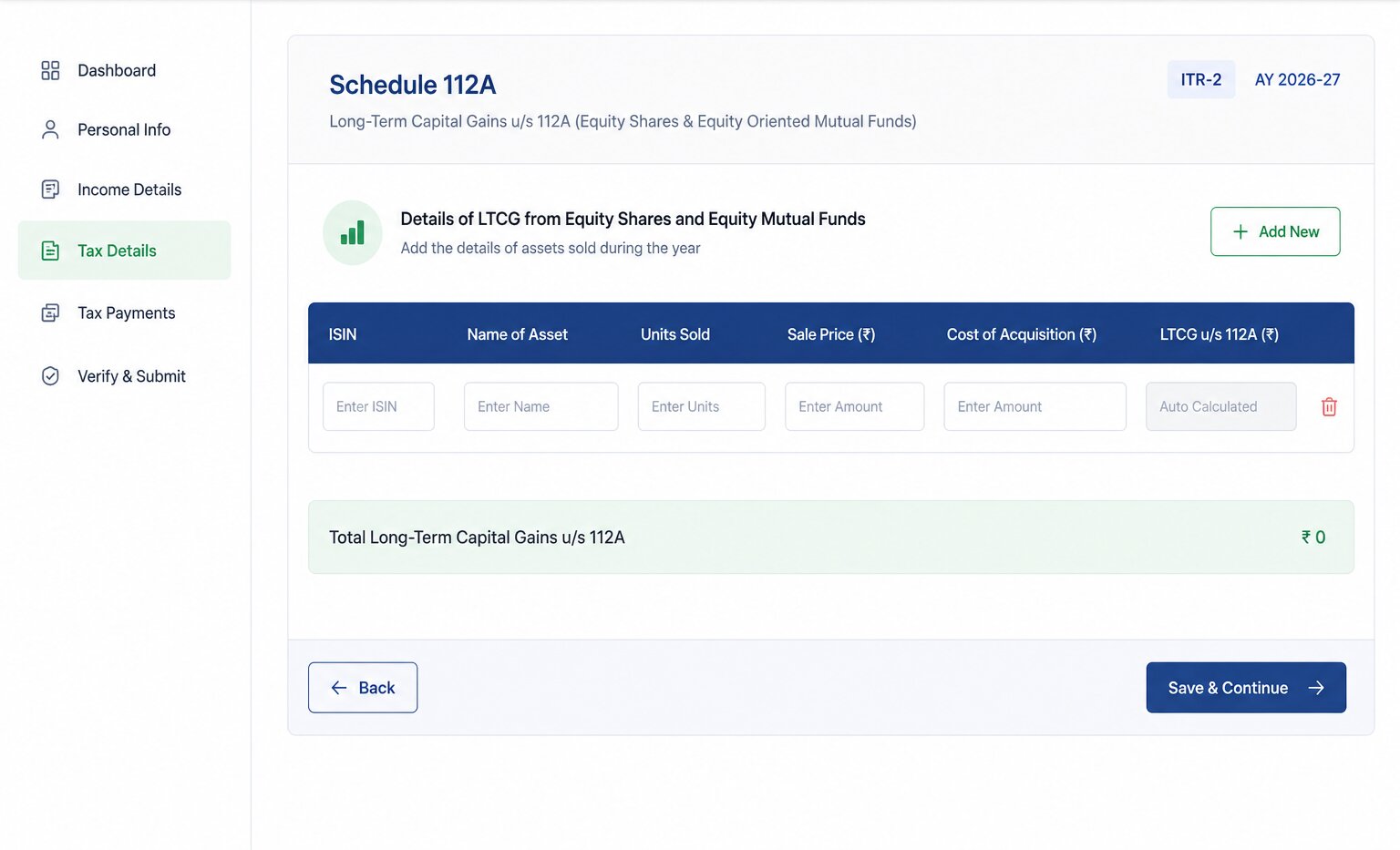
Image Source : AI
The two mistakes that cause most defective return notices
Mistake 1: Filing ITR-1 when you have STCG
For AY 2026-27, ITR-1 is allowed only if your sole capital gain is LTCG under Section 112A up to ₹1.25 lakh with no loss to carry forward. This is a new restriction. Any STCG — even ₹500 from a mutual fund redemption — requires ITR-2. If you have already filed ITR-1 with STCG, it will be marked defective and you will receive a notice to refile. Check your AIS carefully for any small redemptions that may have generated STCG — fund switches, partial withdrawals, and STP transactions all count as redemptions.
Mistake 2: Reporting investment amount instead of gain amount
This is the most common error for first-time ITR-2 filers with mutual funds. The ITR asks for the capital gain — the profit — not the total redemption amount or the original investment. If you redeemed ₹1.5 lakh from a fund you originally invested ₹1 lakh in, the gain is ₹50,000. Only ₹50,000 goes in Schedule CG, not ₹1.5 lakh. Your capital gains statement from CAMS or KFintech shows the computed gain directly — use that figure, not the redemption proceeds.
Special situations worth knowing
SIP redemptions
When you redeem units from a fund you invested in via SIP, each monthly instalment has its own purchase date and cost. The holding period and gain are calculated separately for each instalment. Your CAMS or KFintech statement handles this automatically — the capital gains statement shows the aggregated gain by fund and by gain type, with the underlying instalment-level detail. You do not need to enter each instalment separately in ITR-2; use the aggregated figures from the statement.
Fund switches and STP transactions
Switching from one mutual fund to another — or a Systematic Transfer Plan (STP) — is treated as a redemption of the source fund and a purchase of the destination fund for tax purposes. Each switch generates a capital gain or loss event in the source fund. These appear in your capital gains statement and must be reported in ITR-2, even though no actual cash left your account.
ELSS units unlocked and redeemed
ELSS units redeemed after the 3-year lock-in are treated as long-term capital gains under Section 112A — taxed at 12.5% above ₹1.25 lakh. If you redeemed ELSS units this year, they go in Schedule 112A along with any other equity fund LTCG. For more on ELSS as a tax-saving instrument, see our comparison of ELSS vs PPF vs FD.
Also Read: The Power of Compounding: Why Your 30s Are Not Too Late | The Power of SIP: How Your Money Grows Over Time
Questions first-time ITR-2 filers ask
Do I need to file ITR-2 if my capital gains are below ₹1.25 lakh?
It depends on the type of gains. If your only capital gain is LTCG from equity shares or equity mutual funds under Section 112A, and it is below ₹1.25 lakh (fully exempt), and you have no losses to carry forward, you may be able to file ITR-1 for AY 2026-27. But if you have any STCG at all — even ₹100 — you must use ITR-2. When in doubt, use ITR-2; it covers all scenarios that ITR-1 covers plus more. See our guide on how to file ITR for salaried individuals for the full form selection guide.
I only held mutual funds — I didn’t sell anything. Do I still need to show them in ITR?
No. Mutual fund holdings that were not redeemed, switched, or transferred in FY 2025-26 do not create a tax event and do not need to be reported in your ITR. You report only realised gains — money that came in from a redemption, switch, or STP during the year. Unrealised gains (paper profits on holdings you still own) are not reportable.
My mutual fund shows a loss this year. Do I still need to file ITR-2?
Yes — and you should. Reporting a capital loss in ITR-2 is how you lock in the carry-forward benefit. A short-term capital loss can offset gains from other capital assets for the next 8 years. A long-term capital loss can offset LTCG for the next 8 years. If you do not file on time (by July 31, 2026), this carry-forward right is permanently lost for this year’s losses. Filing is mandatory even if the net result is a loss.
What if my AIS shows a different capital gain amount from my CAMS statement?
The AIS gets its data from RTAs (CAMS and KFintech) and depositories, which sometimes record transactions at slightly different values from what your statement shows — particularly for switches and STPs. If there is a mismatch: first compare the transactions one by one to identify which ones differ. Then file a feedback on the AIS portal flagging the discrepancy before submitting your ITR. If the mismatch is small and you cannot resolve it before the deadline, report the figure from your own capital gains statement and add a note in the remarks field. Do not leave the discrepancy unaddressed — it can trigger a notice after filing.
Does debt mutual fund gain need to be shown in Schedule 112A?
No. Schedule 112A is specifically for LTCG from equity shares, equity-oriented mutual funds, and REITs/InvITs where STT was paid. Debt mutual fund gains — regardless of holding period — go in Schedule CG under the appropriate STCG or LTCG sub-section for debt. Putting debt fund gains in Schedule 112A would be an error.
Can I claim deduction on capital gains under Section 80C or 80D in ITR-2?
Section 80C and 80D deductions reduce your gross total income before tax is calculated. Capital gains taxed at special rates (20% STCG, 12.5% LTCG) are kept separate from the normal income calculation — 80C reduces your salary and other income, but the special-rate capital gains tax is calculated independently. This is also why the 87A rebate does not apply to these gains. For a full picture of the 80C options relevant to your tax regime, see our guide on old vs new tax regime.

Hello there, my name is Phulutu, and I am the Head Content Developer at Nivesh Karlo. I have 13 years of experience working in fintech companies. I have worked as a freelance writer. I love writing about personal finance, investments, mutual funds, and stocks. All the articles I write are based on thorough research and analysis. However, it is highly recommended to note that neither Nivesh Karlo nor I recommend any investment without proper research, and to read all the documents carefully.